Reading incoming text messages while driving creates unnecessary distractions that can take attention away from the road. Many drivers want to stay informed about important messages without picking up their phones or looking at notifications.
Modern text-to-speech technology allows drivers to hear text messages while driving through audio playback. Instead of reading messages on a screen, incoming messages can be converted into spoken audio and played through a vehicle’s speakers, Bluetooth headset, or connected audio system.
For drivers looking to maintain awareness of incoming communication while keeping their eyes on the road, hands-free message reading offers a practical communication solution.
Why Drivers Should Avoid Looking At Their Phones
Even a brief glance at a phone screen can interrupt visual attention and situational awareness while driving. Incoming messages often create curiosity that encourages drivers to check notifications immediately.
Organizations such as the National Highway Traffic Safety Administration (NHTSA) emphasize the importance of minimizing distractions and keeping attention focused on driving tasks.
Listening to messages instead of reading them helps reduce the need to interact with a phone while driving. Rather than checking every notification manually, drivers can receive information through audio playback.
Many drivers use hands-free communication tools to stay informed without shifting their attention from traffic conditions, navigation, pedestrians, or other vehicles.
What Is Text-To-Speech Message Reading?
Text-to-speech (TTS) message reading is a technology that converts written text into spoken audio.
When a compatible message arrives, the system detects the notification, extracts the message content, and uses a speech engine to read the message aloud.
This process allows drivers to hear incoming communication while continuing to focus on driving.
Related capability: Text-To-Speech Message Reading
How Message Reading Works
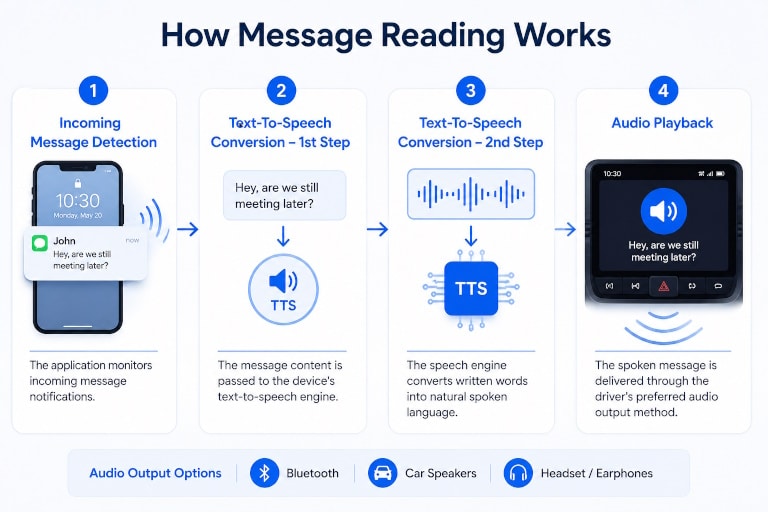
Incoming Message Detection
The application monitors incoming message notifications from supported communication channels.
When a new message arrives, the notification is identified and prepared for processing.
Text-To-Speech Conversion
The message content is passed to the device’s text-to-speech engine.
The speech engine converts written words into natural spoken language that can be understood without viewing the screen.
Audio Playback
The spoken message is delivered through the driver’s preferred audio output method, including Bluetooth devices, vehicle speakers, or connected headsets.
The driver hears the message without needing to touch the phone or read the display.
Types of Messages That Can Be Read Aloud
SMS
Traditional text messages can be converted into spoken audio immediately after arrival, allowing drivers to hear personal or business communications without opening the messaging app.
Incoming WhatsApp notifications can be announced and read aloud through supported notification-reading functionality.
Telegram
Telegram messages can also be processed through notification-based text-to-speech systems, helping drivers stay informed while remaining hands-free.
Messenger Notifications
Supported Messenger notifications can be converted into spoken audio so drivers can hear text messages while driving without checking their phones.
Many modern drivers use multiple messaging platforms throughout the day. Audio message reading helps create a more consistent hands-free communication experience across different channels.
Benefits of Hearing Messages Instead of Reading Them
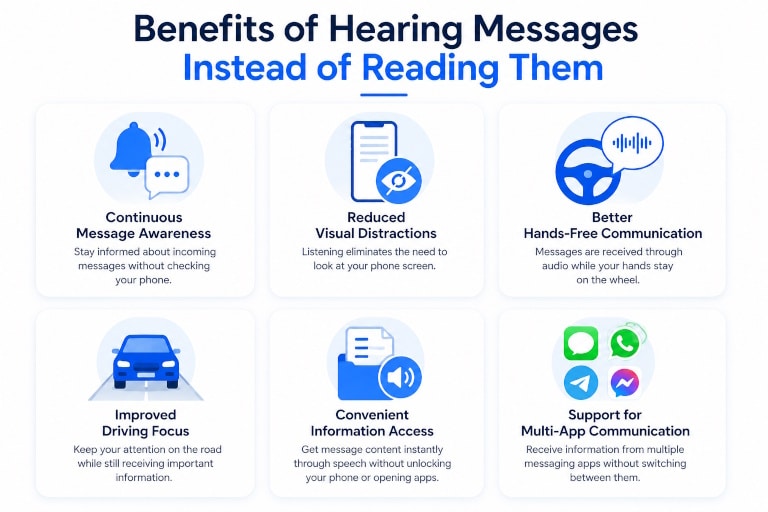
Unlike message auto-replies, the primary goal of message reading is awareness rather than response.
Key benefits include:
Continuous Message Awareness
Drivers can stay informed about incoming communications without needing to stop and manually review notifications.
Reduced Visual Distractions
Listening eliminates the need to repeatedly glance at a phone screen to determine whether a message requires attention.
Better Hands-Free Communication
Messages can be received through audio while both hands remain available for vehicle control.
Improved Driving Focus
Drivers can maintain attention on road conditions while still receiving important information.
Convenient Information Access
Message content becomes available instantly through speech without unlocking the device or opening applications.
Support for Multi-App Communication
Drivers can receive information from several communication channels without switching between apps.
Research from the Centers for Disease Control and Prevention (CDC) distracted driving resources highlights how reducing visual distractions can contribute to safer driving habits.
Combining Message Reading With Auto Reply
Message reading and automatic replies solve different communication challenges.
Message reading focuses on helping drivers hear incoming information.
Auto reply focuses on informing contacts that the driver is currently unavailable.
When used together, drivers can:
- Hear incoming messages through audio playback
- Keep their hands on the wheel
- Avoid reading notifications manually
- Automatically notify contacts that they are driving
- Maintain communication awareness without immediate interaction
Related solution: How to Auto Reply While Driving
Related use case: Driving Auto Reply
How LeMi Apps Supports Hands-Free Driving
The Safe Driving – Calls & SMS Reply app helps drivers manage communication without unnecessary phone interaction.
Features include:
- Text-to-speech message reading
- SMS reading while driving
- Message notification announcements
- Bluetooth-triggered driving mode
- Hands-free communication tools
- Automatic driving responses
- Support for multiple messaging platforms
- Custom driving automation settings
By combining message awareness with driving-focused communication tools, drivers can reduce the temptation to interact with their phones while on the road.
Hear Text Messages while Driving Without Looking at Your Phone
Stay informed while keeping your attention where it belongs—on the road.
The Safe Driving – Calls & SMS Reply app helps drivers listen to incoming messages, use text-to-speech message reading, and maintain hands-free communication while driving.
Explore Safe Driving – Calls & SMS Reply
FAQ
Can I hear text messages while driving?
Yes. Text-to-speech technology can convert incoming messages into spoken audio so you can listen instead of reading them on your phone.
What types of messages can be read aloud?
Depending on the application and device permissions, supported messages may include SMS, WhatsApp, Telegram, Messenger notifications, and other notification-based communications.
Does message reading require touching the phone?
No. Once configured, incoming messages can be detected and read aloud automatically through connected audio devices or vehicle speakers.
What is text-to-speech message reading?
Text-to-speech message reading converts written message content into spoken audio so drivers can listen to incoming messages without looking at the phone screen.
Can message reading work with Bluetooth car systems?
Yes. Many text-to-speech solutions can play audio through Bluetooth-connected vehicle speakers or headsets.
Can message reading and auto reply work together?
Yes. Drivers can listen to incoming messages through text-to-speech while automatic replies inform contacts that they are currently driving.
Which LeMi Apps product supports reading text messages while driving?
The Safe Driving – Calls & SMS Reply app includes text-to-speech functionality designed to help drivers hear incoming messages hands-free while driving.