Smart Communication Automation for Every Situation
LeMi Apps provides advanced automation capabilities for SMS, calls, driving safety, customer communication, availability management, and multi-channel messaging workflows.
Build automated communication systems using smart triggers, schedules, contact rules, keyword responses, and hands-free driving automation.
Use Cases
Compare Automation Features
Start Automating Messages
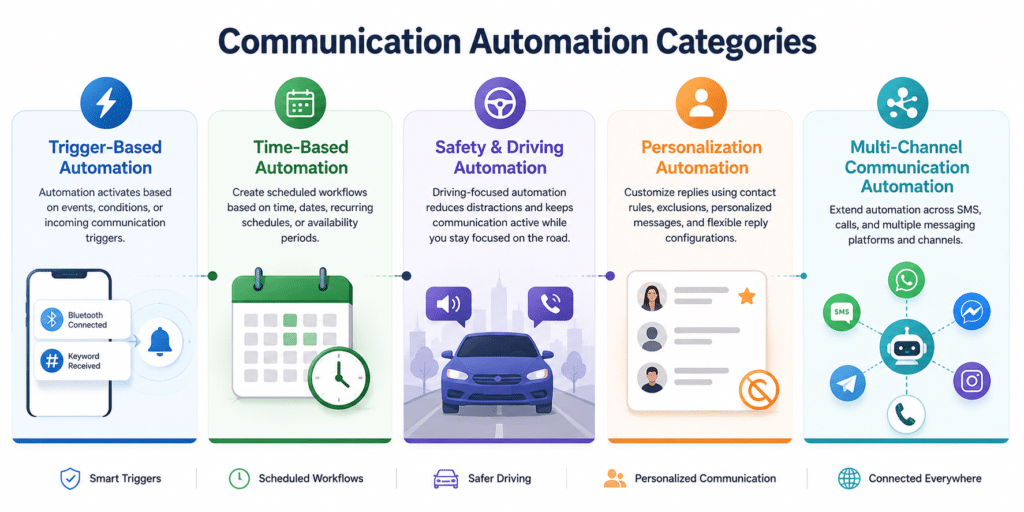
Trigger-Based Automation
Automation can activate automatically based on events, conditions, or incoming communication triggers.
Bluetooth Triggered Auto Reply
Automatically activate auto replies when connecting to Bluetooth devices or vehicle systems.
Send automatic responses when specific SMS keywords or trigger phrases are received.
Time-Based Automation
Create scheduled communication workflows based on hours, dates, recurring schedules, or availability periods.
Automatically enable and disable replies during selected schedules, meetings, or business hours.
Safety & Driving Automation
Driving-focused automation reduces distractions and keeps communication active while users remain focused on the road.
Read incoming messages aloud for safer hands-free communication while driving.
Automatically reply to missed calls when users are unavailable or currently driving.
Personalization Automation
Customize communication automation using contact rules, exclusions, personalized responses, and flexible reply configurations.
Create personalized automatic replies for specific contacts or contact groups.
Exclude selected contacts or phone numbers from receiving automatic replies.
Create custom reply templates for different communication situations and workflows.
Multi-Channel Communication Automation
Automation workflows can extend beyond SMS into multiple messaging platforms and communication channels.
Extend automation across SMS, WhatsApp, Telegram, Messenger, and additional messaging apps.
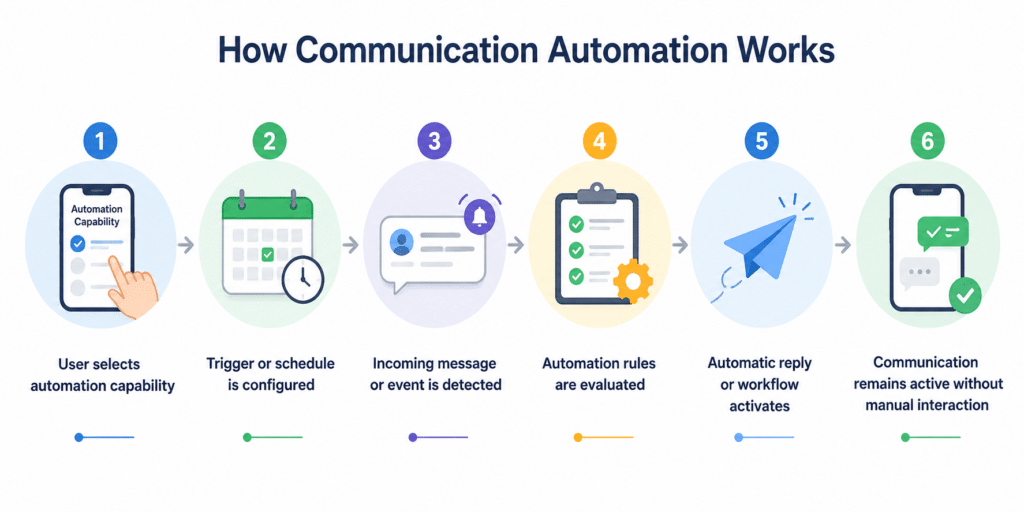
How Communication Automation Works
- User selects automation capability
- Trigger or schedule is configured
- Incoming message or event is detected
- Automation rules are evaluated
- Automatic reply or workflow activates
- Communication remains active without manual interaction
How Capabilities Work Together
| Trigger | Action | Use Case |
| Bluetooth | Auto Reply | Driving |
| Schedule | SMS Reply | After Hours |
| Keyword | Customer Response | Lead Generation |
| Contact Rule | Personalized Reply | VIP Communication |
Supported Communication Channels
- SMS
- Calls
- WhatsApp Business
- Telegram
- Messenger
- Signal
- Microsoft Teams
- Google Chat
- Discord
- Viber
- Skype
Explore Real-World Use Cases
- Safe Driving
- Delivery Drivers
- Fleet Drivers
- Meetings & Unavailable Times
- After-Hours Automation
- Customer Engagement
- SMS Marketing
Frequently Asked Questions
Can auto replies activate automatically while driving?
Yes. Automation can activate automatically using Bluetooth connections or driving-related triggers.
Can I schedule automatic text replies?
Yes. Users can create scheduled auto replies for meetings, work hours, vacations, and recurring availability periods.
Can auto replies work with WhatsApp?
Yes. LeMi Apps supports SMS and multiple messaging platforms including WhatsApp and WhatsApp Business.
Can I create personalized replies for specific contacts?
Yes. Different contacts or groups can receive different automatic reply messages.
Can I disable replies for certain contacts?
Yes. Do Not Reply lists allow users to exclude selected contacts from automation.