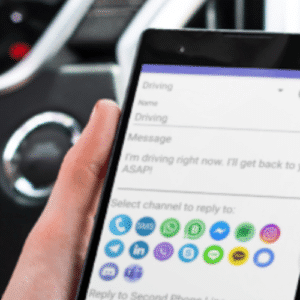
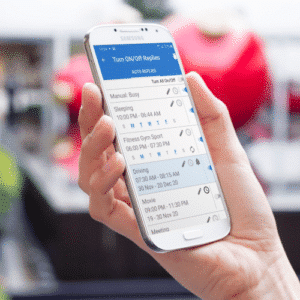
Whether you’re using Safe Driving App for safer driving, hands-free communication, or automatic SMS responses, this Safe Driving Auto Reply FAQ answers the most common questions about configuring auto replies, activating Driving Mode, Bluetooth activation, driving detection, text-to-speech, contacts, messaging apps, premium features, and troubleshooting.
1. Getting Started
How do I activate Driving Mode?
You can activate Driving Mode manually by scheduling and then turning on the desired auto reply profile or let it activate automatically using Bluetooth or driving detection. Once activated, the app automatically replies to incoming messages according to your settings.
How do I choose or change the default auto reply?
Open General Settings (app menu), then choose Default Auto Reply. You can also tap the default auto reply name on the Turn ON / OFF auto replies screen to quickly select another profile.
How do I configure settings for each auto reply?
Each auto reply has its own settings. Tap the Settings icon next to the desired auto reply
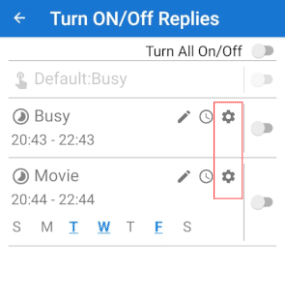
to configure options such as Text-to-Speech, reply behavior, and other preferences.
What is the difference between Active, Waiting and Running mode?
Activemeans the Auto Reply profile is turned on and running in the background. An outlined arrow icon appears in the notification bar. Keeping the profile active helps prevent Android or third-party battery optimization apps from stopping it.
Waiting means the Auto Reply profile is active but waiting for its scheduled start time or activation condition, such as Bluetooth connection or driving detection.
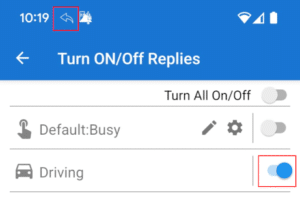
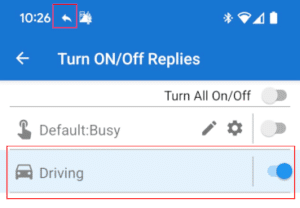
Running means the Auto Reply is currently active and sending automatic replies. A filled arrow icon appears in the notification bar, and the notification shows which Auto Reply profile is currently running.
How do I delete a time profile?
Press and hold the auto reply profile on the Turn ON / OFF auto replies screen until the toolbar appears in the upper, right corner, then tap the Delete icon.
How do I delete an auto reply?
On the Add/Edit screen, select the Auto Reply you want to remove, and then tap the Delete icon.
2. Driving Mode
How does Driving Mode work?
Driving Mode automatically sends replies while you’re driving so callers and message senders know you’re unavailable. It can be activated manually, by Bluetooth connection, or automatically when driving is detected.
Why didn’t Driving Mode activate?
Verify that the profile is enabled and appears in Waiting mode before driving. If no status icon appears, the profile may not be active or Android may have stopped the app because of battery optimization or another system restriction.
How does driving detection work?
Driving detection monitors your device’s movement. When movement consistent with driving is detected, the selected Auto Reply profile activates automatically.
Can Driving Mode activate automatically?
Yes. You can configure Driving Mode to activate automatically using Bluetooth connections or motion-based driving detection.
Can I activate Driving Mode using Bluetooth?
Yes. Pair your vehicle’s Bluetooth system and select it as the activation trigger. When your phone connects to that Bluetooth device, Driving Mode activates automatically.
3. Auto Reply Settings
How do I send only one reply per contact?
Enable Send Only One Reply in the auto reply settings.
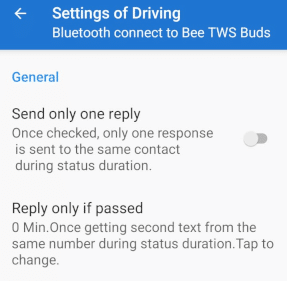
Each contact will receive only one automatic reply during the active session.
Can I reply only to contacts?
Yes. Enable Reply Only to Contacts to send automatic replies only to people saved in your contacts.
Can I reply only to non-contacts?
Yes. Enable Reply Only to Non-Contacts if you want automatic replies sent only to unknown numbers.
Can I reply only when connected to Wi-Fi?
Yes. Enable Reply Only When Wi-Fi Connected if you want replies sent only while connected to Wi-Fi.
Can I prevent replies to emergency contacts?
Yes. Add contacts to your Emergency List and enable Do Not Reply to Emergency List.
Can I reply even if I answered the call?
Yes. Enable Reply Even When Call Was Answered if you want the automatic reply sent regardless of whether you answered the incoming call.
Can I hear messages without sending a reply?
Yes. Enable Read Without Reply to have incoming messages read aloud without sending an automatic reply.
Why can’t I edit an active auto reply?
An active auto reply cannot be edited. Turn it off first, make your changes, then activate it again.
How do I enable Dark Theme?
Open General Settings (app menu) and enable Dark Theme.
How do I turn off the phone ringer while Auto Reply is active?
Enable Turn Off Ringer While Auto Reply Is Active in the auto reply settings. Incoming calls will be silenced while Driving Mode is running.
4. Contacts & Personalized Lists
How do I reply only to selected contacts?
Create a Personalized List, then enable Reply to Personalized List Only in the auto reply settings.
How do I create a Personalized List?
Open the Personalized List editor, tap Add, then select the contacts or groups you want to include.
How do I remove contacts from a list?
Open the desired list, press and hold the contact, then tap Delete.
How do I copy contact lists between auto replies?
Open the destination auto reply, tap Add, choose Copy from Other Auto Reply, and select the source profile.
5. Messaging & SMS
Why doesn’t the app reply to WhatsApp, Telegram, or Messenger?
Safe Driving Auto Reply works by detecting incoming message notifications from supported messaging apps and using the notification’s Reply action to send automatic responses. Make sure notifications are enabled for each messaging app (such as WhatsApp, Telegram, Viber, or Messenger). If notifications are turned off, the app cannot detect incoming messages or send automatic replies.
Which messaging apps are supported?
Safe Driving Auto Reply supports automatic replies for SMS and compatible messaging apps that provide notification reply actions, including WhatsApp, Telegram, Messenger, Signal, Viber, Discord, Skype, LINE, KakaoTalk, Google Chat, Microsoft Teams, LinkedIn, Instagram.
How do I reply to RCS messages?
Enable notifications for your default SMS application. The app detects RCS messages through Android notifications and replies using the available notification action.
Can the app reply to WhatsApp groups?
Yes. You can choose whether automatic replies are sent to supported messaging groups.
Can I stop replying to SMS group messages?
Google Play versions currently have limited support for SMS group conversations. Improvements are under development.
How do I send long SMS messages?
Android automatically splits long messages into multiple SMS segments. Most recipients will receive them as one combined message.
How does Ignore Short Numbers work?
Android may format short numbers (e.g., 5-digit codes) with your country code (e.g., +1).
To ignore these, go to settings and set “Ignore numbers shorter than X digits” (e.g., 7 for the USA).
How do I block a range of phone numbers?
Specify the start and end of the phone number range. Any number within that range will be ignored.
You can block a full range like this:
+1 812 100 0000 – +1 812 999 9999
This would block all numbers from the 812 area code.
Does the app support Dual SIM?
Currently, replies are sent using your phone’s default SIM. Full Dual SIM support is planned for a future release.
6. Text-to-Speech
How do I enable Text-to-Speech?
Open the desired auto reply settings and enable Read Incoming Messages Aloud.
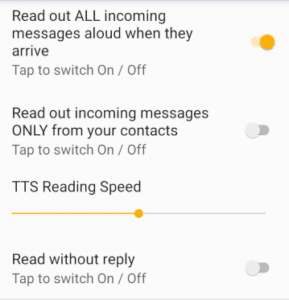
You can also enable “Read Incoming Messages Aloud” directly from the schedule screen.
Learn more about How to Hear Text Messages While Driving
Why aren’t incoming messages read aloud?
Verify that Text-to-Speech is enabled and check options such as Read Only from Contacts or Read Only If Replied, which may prevent some messages from being spoken.
Can the app read messages without replying?
Yes. Enable Read Without Reply.
Can it read messages only from contacts?
Yes. Enable Read Only From Contacts.
7. Bluetooth & Driving Detection
How does Bluetooth activation work?
Driving Mode automatically starts when your phone connects to a selected Bluetooth device, such as your vehicle’s hands-free system.
Which Bluetooth devices are supported?
Most vehicle Bluetooth systems, car stereos, motorcycle helmets, and other compatible Bluetooth devices supported by Android.
Why didn’t Bluetooth activate Driving Mode?
Verify that the correct Bluetooth device is selected and that the Auto Reply profile is enabled and waiting for activation. – running in the background.
How does motion-based driving detection work?
The app detects movement that matches driving and automatically activates the selected Driving Mode profile.
8. Premium & Licensing
I upgraded my phone. Can I reinstall the paid app?
Yes. Install the app using the same Google account used for the original purchase. Your purchase will be restored automatically.
Will my purchase transfer automatically?
Yes, provided you use the same Google Play account.
Do I need to buy Premium again?
No. As long as you use the same Google account that was used to purchase Premium, your purchase will be restored automatically.
9. Troubleshooting
What should I do if Driving Mode doesn’t start?
Confirm the profile is enabled, check battery optimization settings, and verify that automatic activation conditions are configured correctly.
What should I do if Bluetooth doesn’t activate the app?
Verify Bluetooth is connected to the selected device and that the correct Bluetooth trigger is configured.
What should I do if auto replies are not being sent?
Check that the profile is active, required permissions are granted, and battery optimization is disabled for the app.
What should I do if messages are not read aloud?
Verify Text-to-Speech settings, your device’s TTS engine, and any contact or reply filters.
What should I do if notifications are not detected?
Ensure Notification Access permission is granted and notifications are enabled for the messaging app.
What should I do if WhatsApp replies don’t work?
Verify that WhatsApp notifications are enabled and that Android allows notification actions.
What should I do if Premium wasn’t restored?
Make sure you’re signed in with the same Google account used for the purchase, then restart the app or use the restore purchase option if available.
What should I do if the app stops working after a phone restart?
Some Android manufacturers aggressively stop background apps after reboot. Open the app once after restarting, verify battery optimization settings, and ensure the auto reply profile is active.