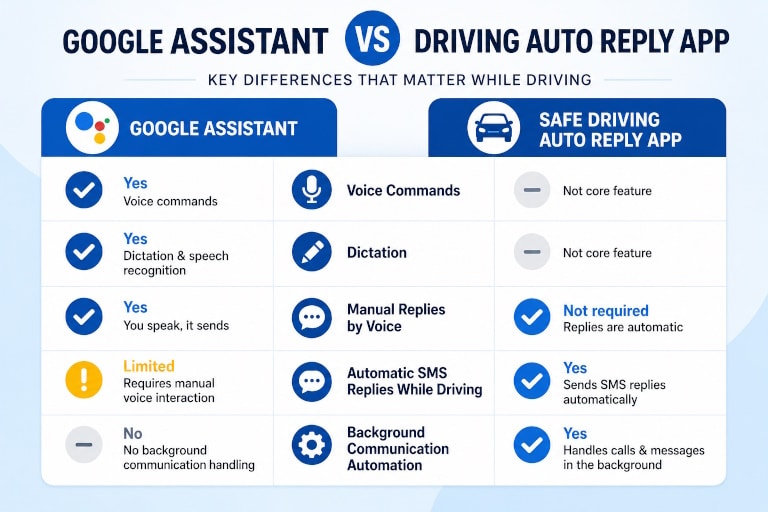
Google Assistant vs safe driving auto reply app is not really a comparison between two versions of the same tool. Google Assistant is a voice assistant designed for speech commands, dictation, and manual hands-free interaction. Safe Driving Auto Reply App is a driving communication automation app built to automatically reply to incoming calls and messages while you drive.
If you want to send a message with your voice while driving, Google Assistant can help. If you want your phone to automatically handle incoming communication in the background, a driving auto reply app is built for this job.
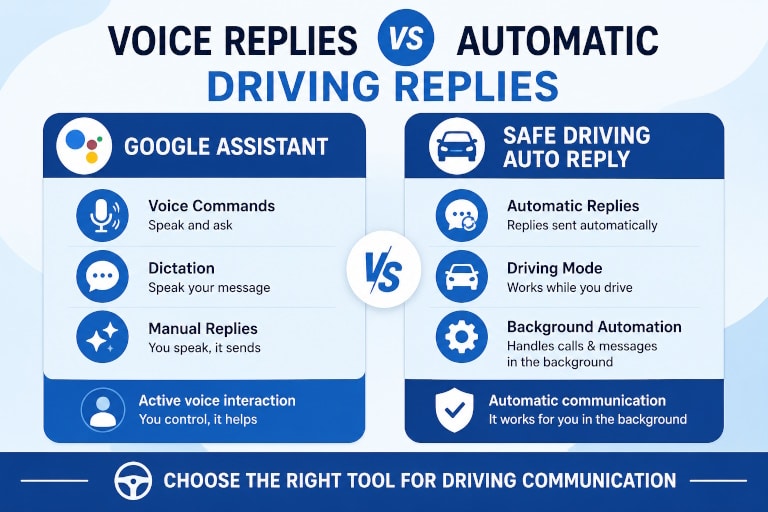
- Google Assistant: voice commands, dictation, manual replies
- Safe Driving Auto Reply: automatic replies, missed call replies, driving automation
- Best for: active voice use vs passive background handling
What Google Assistant Does
Google Assistant is useful when you want to control your phone with your voice. It can help you:
- send a text message by voice
- dictate a reply
- place a phone call
- ask for directions
- open apps or perform commands
- read or help manage certain messages depending on device and setup
In other words, Google Assistant is designed for hands-free commands and voice interaction. If a message comes in and you decide you want to reply right now, Google Assistant can help you do it without typing.
That makes it useful for drivers who want a voice-controlled way to send messages manually.
What Safe Driving Auto Reply Does
Safe Driving Auto Reply App is designed for a different job. Instead of helping you manually dictate a response, it helps your phone respond automatically while you are driving.
Depending on your setup, it can automate driving communication with features such as:
- automatic SMS replies while driving
- automatic responses to missed calls
- Bluetooth activation
- driving detection and activation options
- personalized reply messages
- contact-based rules
- do-not-reply lists
- emergency exceptions
- optional text-to-speech message reading
The goal is not to help you send more voice commands. The goal is to reduce the need to deal with incoming communication while you are on the road.
If you want to understand how this works in practice, see our Driving Auto Reply capability page and the full Safe Driving Auto Reply App product page.
Google Assistant vs Safe Driving Auto Reply: The Main Difference
Google Assistant helps you reply manually
Google Assistant still depends on you to decide to respond, trigger the assistant, speak the message, and confirm the action when needed. It is useful when you want to actively send a message with your voice.
Safe Driving Auto Reply helps your phone reply automatically
Safe Driving Auto Reply is built to automatically send your predefined response when driving mode is active and an incoming message or call arrives. You do not have to start a voice command, dictate a message, or handle each conversation one by one.
That is why Google Assistant cannot fully replace a dedicated auto-reply app for drivers. It can help you communicate by voice, but it does not function as a background driving auto-responder.
Google Assistant vs Safe Driving Auto Reply: Can Google Assistant Replace an Auto Reply App?
For most drivers asking this question, the answer is no.
Google Assistant can replace a small part of the workflow if your only need is:
- sending a message with your voice
- dictating a quick reply
- making a call hands-free
- using conversational voice commands while driving
But it does not replace a driving auto-reply app if your real goal is:
- automatically replying to incoming texts while driving
- automatically responding to missed calls
- handling communication in the background
- reducing interruptions without needing to speak every time
- setting rules before a trip and letting the app handle the rest
Google itself documents Google Assistant’s messaging capabilities around sending and reading messages by voice, which reinforces the point that Assistant is designed around voice-driven interaction, not background auto-reply automation. You can see that in Google’s own support documentation for sending and reading messages with Google Assistant and voice typing on Android. Google Assistant message help and Android voice typing help both focus on speaking, dictating, and sending manually.
Why This Difference Matters While Driving
A voice assistant can reduce typing, but it still keeps you involved in the communication process. You still have to hear the message, decide whether to respond, trigger the assistant, and speak the reply.
A driving auto-reply app solves a different problem: it removes routine message handling from the drive itself.
That matters because the safest communication while driving is often the communication you do not have to manage in the moment. The U.S. National Highway Traffic Safety Administration repeatedly warns that texting and other phone interaction while driving creates dangerous distraction, and recommends reducing phone-related activity behind the wheel.
Their distracted driving guidance is relevant here because it highlights why many drivers prefer automatic communication handling instead of active message management while driving. See NHTSA’s Distracted Driving guidance for the broader safety context.
When Google Assistant Is the Better Fit
Google Assistant is a better fit if your main goal is:
- using voice commands instead of touching the phone
- dictating texts manually
- asking your phone to call, navigate, or perform tasks
- having a general-purpose voice assistant beyond driving communication
If your question is, “Can I send a reply without typing?” Google Assistant may be enough.
When Safe Driving Auto Reply Is the Better Fit
Safe Driving Auto Reply is the better fit if your goal is:
- automatically replying while driving
- sending a predefined message to incoming contacts
- responding to missed calls with an automatic text
- activating communication rules when you start driving
- minimizing the need to handle each message individually
If your question is, “Can my phone handle incoming communication for me while I drive?” then a dedicated driving auto-reply app is the better solution.
If hearing incoming messages matters too, you may also want to read How to Hear Text Messages While Driving. If your main priority is automatic message handling while on the road, see How to Auto Reply While Driving.
Google Assistant vs Safe Driving Auto Reply App: Bottom Line
Google Assistant is useful for voice commands, dictation, and hands-free manual replies. Safe Driving Auto Reply is built for automatic communication handling while driving.
So if you want to speak a reply, use a voice assistant.
If you want your phone to send the reply automatically while you stay focused on the road, use a dedicated driving auto-reply app.
Automate Your Driving Communication
Safe Driving Auto Reply App is built for drivers who want incoming calls and messages handled automatically while they are on the road.
Try Safe Driving Auto Reply App
automate SMS replies, respond to missed calls, and reduce phone interaction while driving.
You may also want to compare Android Auto vs Safe Driving Auto Reply App and Tasker vs Safe Driving Auto Reply App if you are evaluating other Android-based alternatives for driving communication.
Frequently Asked Questions
Can Google Assistant automatically reply to text messages while I drive?
Not in the same way as a dedicated driving auto-reply app. Google Assistant can help you send a reply using voice commands, but it still relies on manual voice interaction. A driving auto-reply app is designed to send responses automatically in the background.
Is Google Assistant the same as a driving auto reply app?
No. Google Assistant is a voice assistant focused on spoken commands, dictation, and interactive help. A driving auto-reply app is focused on automatic communication handling while you are driving.
Can Google Assistant reply to missed calls automatically?
It is not designed as a missed-call auto-reply system. Dedicated auto-reply apps are better suited for automatically responding to missed callers with predefined messages.
When should I use Google Assistant instead of Safe Driving Auto Reply?
Use Google Assistant when you want to actively control your phone by voice, such as dictating a message or placing a call. Use Safe Driving Auto Reply when you want incoming communication handled automatically without needing to respond manually every time.
Can I use Google Assistant and Safe Driving Auto Reply together?
Yes. They serve different roles. Google Assistant can help with occasional voice commands, while Safe Driving Auto Reply can automatically manage incoming messages and calls in the background while you drive.
Google Assistant vs Safe Driving Auto Reply- What is the main advantage of Safe Driving Auto Reply over Google Assistant?
The main advantage is automation. Safe Driving Auto Reply is designed to automatically respond to incoming communication while driving, while Google Assistant mainly helps you perform actions manually using voice commands.