If you want to automate communication while driving, there are two very different ways to do it on Android. You can build your own workflow with Tasker, or you can use a purpose-built app like Safe Driving Auto Reply App.
That distinction matters because Tasker vs Safe Driving Auto Reply App is not a simple feature-vs-feature comparison. Tasker is a full Android automation platform. Safe Driving Auto Reply is a dedicated communication automation app built specifically for driving-related calls and messages.
For some users, Tasker is the better option because it offers much deeper automation flexibility. For others, a dedicated app is the better choice because it delivers ready-made communication automation without requiring them to build profiles, tasks, and logic from scratch.
This comparison explains what Tasker can do, where Safe Driving Auto Reply App differs, and which type of user each solution is best for.
What Is the Difference Between Tasker and Safe Driving Auto Reply App?
Tasker is an Android automation engine. It lets users create automations using profiles, tasks, variables, conditions, and plugins. In practice, that means you can define a trigger such as connecting to your car’s Bluetooth, receiving a text message, reaching a time window, detecting movement, or interacting with another Android event, and then tell Tasker what actions to perform. Tasker’s official documentation and Play Store listing show that it supports a broad automation model built around profiles, contexts, tasks, variables, plugins, and hundreds of automation possibilities. (Tasker)
Safe Driving Auto Reply App is different. It is not a general automation platform. It is a dedicated communication automation app designed specifically for driving situations. Instead of building your own automation logic from scratch, you configure ready-made reply behavior for incoming SMS, missed calls, and supported messaging notifications while driving.
So the real comparison in Tasker vs Safe Driving Auto Reply App is this:
- Tasker helps you build your own automation system
- Safe Driving Auto Reply App gives you a ready-made communication automation solution for driving
That difference affects setup time, learning curve, maintenance, and the type of user each option fits best.
What Tasker Can Do
Tasker is extremely flexible, and that flexibility is the reason this comparison is worth making. With enough configuration, Tasker can automate many of the same outcomes a driving auto reply app provides.
Tasker can be used to build automations such as:
- automatic SMS replies
- Bluetooth-based activation
- time-based schedules
- contact-based rules
- notification-based actions
- complex conditional workflows
- integrations with many Android events, states, and apps
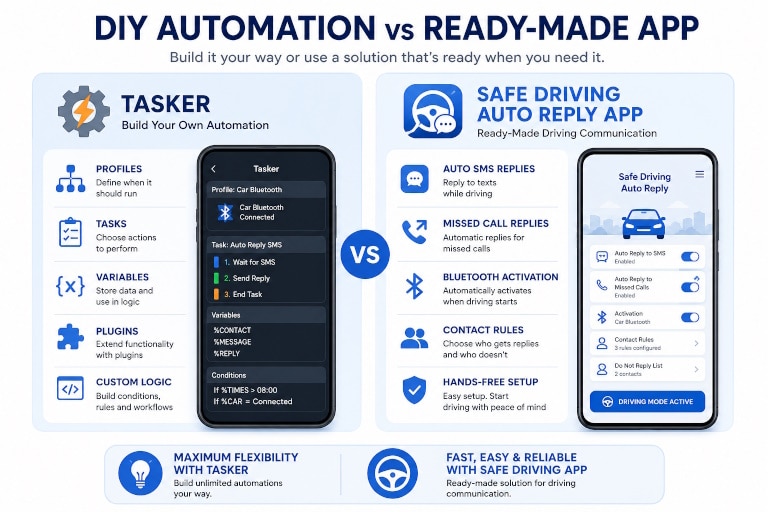
Tasker works by combining profiles and tasks. A profile defines when something should happen. A task defines what happens next. Variables, conditions, and plugins make the workflow much more powerful, because they let users add custom logic and dynamic behavior.
Where Safe Driving Auto Reply App Differs
The difference is not that Safe Driving Auto Reply App necessarily has more automation power than Tasker. The difference is that it is already built around the specific communication problem most users want to solve.
Safe Driving Auto Reply App is designed for one core purpose: managing calls and messages while driving without distracting the driver.
That changes the user experience completely.
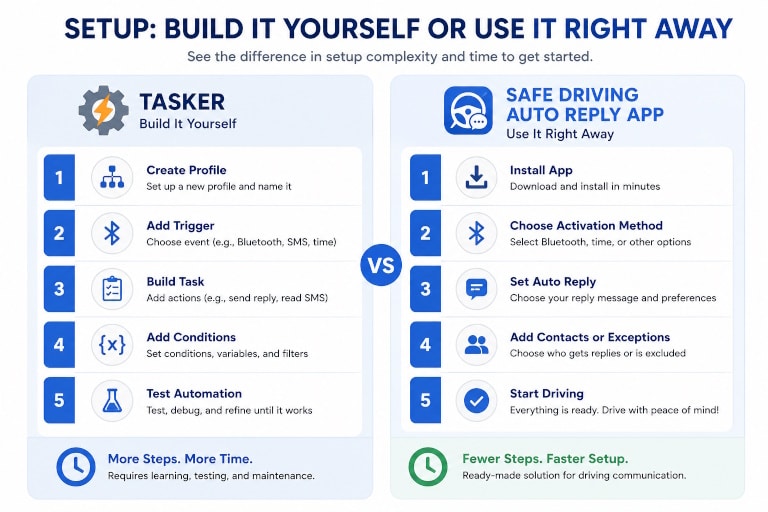
Instead of creating profiles, building tasks, testing variables, and maintaining your own automation flow, you install the app, choose how it should activate, configure your reply behavior, set contact rules or exceptions if needed, and start using it.
Safe Driving Auto Reply App is built around communication-specific workflows such as:
- automatic SMS replies while driving
- missed call auto replies
- Bluetooth and driving-based activation
- contact-based reply rules
- custom reply messages
- do-not-reply lists and exclusions
- emergency exceptions
- message reading and hands-free communication controls
In other words, the app is not asking the user to design the automation framework. The communication workflow already exists. The user is simply configuring it.
If your main goal is to reply to messages and missed calls while driving without building your own automation, that is the biggest difference in Tasker vs Safe Driving Auto Reply App.
Tasker vs Safe Driving Auto Reply App: Ease of Setup
Ease of setup is one of the clearest differences between these two options.
Tasker is powerful, but that power comes with setup complexity. Even a relatively simple driving auto reply workflow can require multiple steps: choosing triggers, creating profiles, building tasks, testing conditions, granting the right permissions, and refining the logic until it behaves exactly the way you want.
Safe Driving Auto Reply App is much easier to get running because it is already structured around the communication use case. The user is not building the logic from scratch. The user is enabling and configuring a ready-made driving communication system.
If you enjoy building automation flows, that may not be a problem. But if you want a working driving reply solution quickly, Safe Driving Auto Reply App usually gets you there faster.
Tasker vs Safe Driving Auto Reply App: Learning Curve
Tasker has a real learning curve. Users need to understand how profiles, contexts, tasks, variables, and sometimes plugins work together. That is exactly why Tasker is so powerful, but it also means new users often need time before they can create a reliable automation setup.
Safe Driving Auto Reply App has a much shorter learning curve because it is designed around a single job. You are working with communication settings and reply rules, not with a general-purpose automation engine.
So if you are comparing Tasker vs Safe Driving Auto Reply App based on ease of use, the dedicated app has a clear advantage for most non-technical users.
Tasker vs Safe Driving Auto Reply App: Customization Depth
This is where Tasker has the advantage.
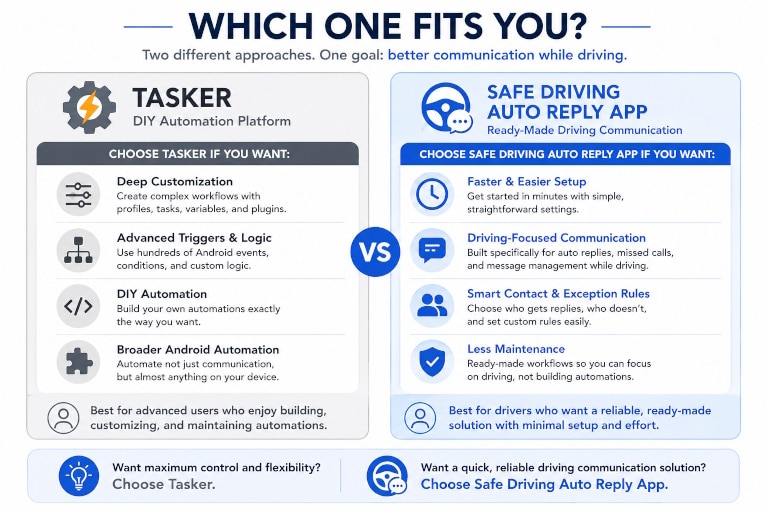
Tasker is an automation platform, not just a communication tool. It can combine many different Android conditions, actions, variables, and integrations into one workflow. If you want highly specific logic such as different actions depending on Bluetooth device, time window, message type, location, notification source, or other conditions, Tasker gives you much deeper control.
Safe Driving Auto Reply App is customizable within the communication problem it is built to solve. It offers practical controls for replies, contacts, schedules, and activation, but it is not trying to be a universal Android automation engine.
So if your priority is maximum flexibility and custom logic, Tasker is stronger. If your priority is ready-made communication automation, Safe Driving Auto Reply App is usually the better fit.
Tasker vs Safe Driving Auto Reply App: Communication-Specific Features
Tasker can automate communication, but communication is only one of many things it can do.
Safe Driving Auto Reply App is designed specifically around communication workflows while driving. That means the app interface, options, and settings are focused on tasks like:
- replying to incoming text messages while driving
- automatically responding to missed calls
- choosing which contacts receive replies
- excluding certain contacts from replies
- applying message rules and exceptions
- activating automatically when driving starts
- managing communication behavior without building a custom automation structure
That difference matters because communication automation is not only about sending a message. It is also about handling real-world usage patterns, repeated behavior, contact logic, exceptions, and quick configuration.
This is one of the strongest reasons users choose a purpose-built app instead of a general automation engine.
Tasker vs Safe Driving Auto Reply App: Maintenance Required
Tasker users are effectively maintaining their own automation system. If you create a custom driving profile, you may later want to refine it, debug it, expand it, or adjust it when Android behavior changes or your own use case changes.
A dedicated app reduces that burden because the automation structure already exists. You still control the settings, but you are not responsible for building and maintaining the full workflow architecture yourself.
If you like tinkering and optimization, that may be part of the appeal of Tasker. If you want something that works with less ongoing maintenance, Safe Driving Auto Reply App has the advantage.
Who Should Use Tasker?
Tasker is the better choice if you want an Android automation platform rather than a single-purpose communication app.
Tasker may be the right fit if you:
- enjoy building your own automation workflows
- want deep control over triggers, tasks, and variables
- already use Tasker for other Android automations
- need behavior that goes beyond standard communication scenarios
- are comfortable testing, refining, and maintaining custom automations
Tasker is especially attractive for advanced Android users who see driving communication automation as just one part of a broader personal automation system.
Who Should Use Safe Driving Auto Reply App?
Safe Driving Auto Reply App is the better choice if your main goal is driving communication automation rather than general Android automation.
Safe Driving Auto Reply App may be the right fit if you:
- want to auto reply to calls and messages while driving without building workflows
- prefer a faster and easier setup experience
- want a communication-focused interface instead of a general automation engine
- need missed call replies, contact rules, schedules, and exclusions in one place
- want a ready-made solution instead of ongoing DIY maintenance
If your question is simply “What is the easiest way to manage calls and messages while driving?”, a dedicated app is usually the better answer.
Final Verdict: Tasker vs Safe Driving Auto Reply App
The right choice depends on what you actually want.
Choose Tasker if you want a flexible Android automation engine and you are comfortable building your own logic. It is the better fit for advanced users who want maximum control and do not mind the learning curve.
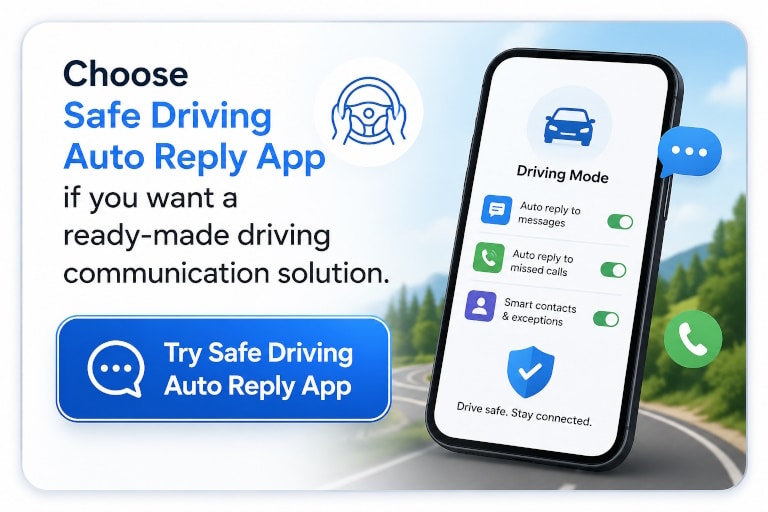
Choose Safe Driving Auto Reply App if you want a ready-made driving communication solution. It is the better fit when your priority is hands-free communication controls working quickly without building the automation yourself.
Try Safe Driving Auto Reply App
Learn More About Driving Communication Automation
If you want to see how a dedicated driving auto reply workflow works in practice, you can also read:
- How to Auto Reply While Driving
- How to Hear Text Messages While Driving
- Android Auto vs Safe Driving Auto Reply App
- Google Assistant vs Safe Driving Auto Reply App
FAQ
What is the difference between Tasker and Safe Driving Auto Reply App?
Tasker is a general Android automation platform that lets users build custom workflows using profiles, tasks, variables, and plugins. Safe Driving Auto Reply App is a dedicated driving communication app that already includes ready-made auto reply workflows for calls, SMS, missed calls, and supported messaging notifications while driving.
Can Tasker auto reply to text messages while driving?
Yes. Tasker can be configured to send automatic text replies while driving or when specific conditions are met. However, users usually need to build the automation themselves by creating profiles, triggers, tasks, and message actions.
Is Tasker more powerful than Safe Driving Auto Reply App?
Tasker is more flexible as a general automation engine because it supports a very wide range of Android triggers, actions, variables, plugins, and workflow combinations. Safe Driving Auto Reply App is less general-purpose, but it is easier to use for communication-specific driving scenarios because the workflows are already built.
Is Safe Driving Auto Reply App easier to set up than Tasker?
Yes, for most users it is. Tasker often requires manual setup of profiles, tasks, triggers, and logic. Safe Driving Auto Reply App is already designed around driving communication, so users can configure reply behavior much faster without building the workflow from scratch.
Can Tasker use Bluetooth as a trigger for driving automation?
Yes. Tasker can use Bluetooth and many other Android events as triggers. For example, users can create a profile that activates when the phone connects to a car Bluetooth device and then run tasks such as sending replies, changing settings, or launching other driving actions.
Who should use Tasker instead of Safe Driving Auto Reply App?
Tasker is a better fit for advanced Android users who want maximum automation flexibility, enjoy building custom workflows, or already use Tasker for broader device automation beyond driving communication.
Who should use Safe Driving Auto Reply App instead of Tasker?
Safe Driving Auto Reply App is a better fit for users who want to manage calls and messages while driving without building workflows themselves. It is designed specifically for communication automation, so setup is simpler and the interface is focused on driving-related use cases.
Can Tasker handle missed call reply automation too?
Tasker can automate many communication actions, but implementing missed call reply logic depends on how the workflow is built, which triggers are used, and what permissions or additional setup are required. A dedicated driving auto reply app is usually simpler if missed call communication is an important part of the use case.
Is Safe Driving Auto Reply App only for SMS?
No. Safe Driving Auto Reply App is designed for broader driving communication management. Depending on the app configuration and Android permissions, it can help manage SMS, missed calls, and supported messaging notifications while driving.
Which is better for most drivers: Tasker or Safe Driving Auto Reply App?
For most drivers, Safe Driving Auto Reply App is the easier and more practical choice because it is purpose-built for driving communication and does not require building automations manually. Tasker is a better choice for users who specifically want a customizable DIY automation platform and are comfortable with a more technical setup.