Find answers to SMS Marketing Auto Reply FAQ, including keyword matching, automatic replies, schedules, contacts, messaging apps, Premium, and troubleshooting.
View SMS Marketing Auto Reply on Google Play
1. Getting Started
Why doesn’t the app reply?
For the Google Play version, notifications must be enabled in your default SMS or messaging app. When a message arrives, you should see a notification that includes a Reply action.
Text SMS Marketing Auto Reply App uses that notification to detect the message and send the automatic response.
The Keyword-Based SMS Marketing App distributed directly from the LeMi Apps website works through SMS permissions and the SMS protocol rather than notification replies.
How do I activate an Auto Reply profile?
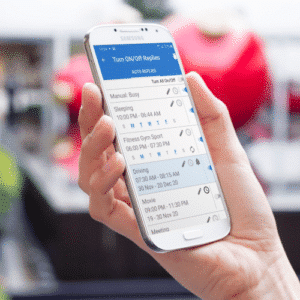
Turn on the desired Auto Reply profile from the main Auto Reply list. If the profile uses a schedule, it will remain active in the background and wait until the scheduled start time.
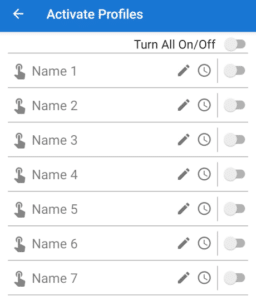
When the schedule is running, the app monitors incoming messages and responds when a configured keyword matches.
Why can’t I edit my Auto Replies?
You cannot edit an Auto Reply while it is active. Turn it off first, make the required changes to the message, keyword rules, contact settings, or schedule, and then turn it on again.
What is the difference between Active, Waiting, and Running?
Active means the Auto Reply profile is turned on and running in the background. An outlined arrow icon appears in the notification bar.
Waiting means the profile is active but waiting for its scheduled start time.
Running means the schedule is currently active and the app is monitoring incoming messages for matching keywords. A filled arrow icon appears in the notification bar.
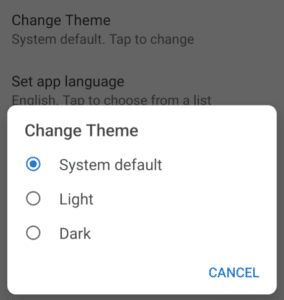
How do I enable Dark Theme?
Open General Settings from the app menu and enable Dark Theme.
2. Keywords & Matching
What is the difference between Exact Match and Contains?
Exact Match sends a reply only when the incoming message matches the keyword exactly, apart from normal differences such as capitalization or surrounding spaces.
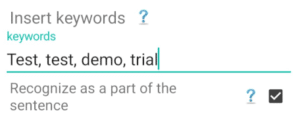
Contains sends a reply when the keyword appears anywhere in the incoming message. For example, the keyword PRICE can match “What is the price?” when Contains is selected.
Can I use multiple keywords?
Yes. You can use multiple keyword rules for the same automatic response.
Why was my keyword not recognized?
Check whether the rule uses Exact Match or Contains, confirm that the keyword is spelled correctly, and make sure the Auto Reply profile is active and its schedule is running.
Also verify that notifications are enabled for the SMS or messaging app and that the incoming message notification includes a Reply action.
Are keywords case-sensitive?
Keywords are generally matched without requiring the sender to use the same capitalization. However, punctuation, extra words, or spelling differences can affect Exact Match rules. Use Contains when you want broader matching.
Can I use phrases as keywords?
Yes. A keyword can be a word or a phrase. For example, you can use “BOOK APPOINTMENT” or “SEND PRICE LIST.” Choose Exact Match for a precise command or Contains when the phrase may appear inside a longer message.
3. Auto Reply Settings
Can I reply to contacts only?
Yes. Open the Auto Reply settings and enable Reply Only to Contacts.
The app will then respond only to senders saved in your device contacts.
How can I make the app send only one reply per contact?
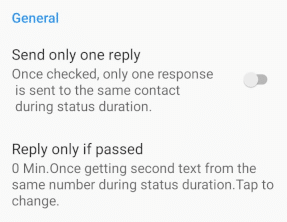
Open the Auto Reply settings and enable Send Only One Reply for one response per active session. You can also use Reply Only If Time Passed to prevent repeated replies until the selected time interval has passed.
How do I delete an entire Auto Reply?
On the Add/Edit screen, select the Auto Reply you want to remove, and then tap the Delete icon.
How do I delete a time profile or schedule?
Press and hold the auto reply profile on the Turn ON / OFF auto replies screen until the toolbar appears in the upper, right corner, then tap the Delete icon.
4. Contacts & Lists
How do I remove contacts from a list?
Open the Add/Edit screen, select the required contact list, press and hold the contact you want to remove, and then tap the Delete icon in the upper corner.
How do I copy contact lists from one Auto Reply to another?
Edit the destination Auto Reply and open the required list. Tap Add, choose Copy from Other Auto Reply, select the source Auto Reply, and confirm.
Can I exclude specific contacts from keyword replies?
Yes. Add those contacts to the appropriate Do Not Reply list on the Add/Edit screen. Messages from excluded contacts will not receive automatic responses.
5. Messaging & SMS
Why doesn’t the app reply to WhatsApp, Telegram, or Messenger?
Keyword SMS Autoresponder works by detecting incoming message notifications from supported messaging apps and using the notification’s Reply action to send automatic responses.
Make sure notifications are enabled within each messaging app, such as WhatsApp, Telegram, Viber, or Messenger. If notifications are turned off, the app cannot detect incoming messages or send automatic replies.
How do I reply to RCS or chat messages?
Enable notifications in your default SMS app. The app detects incoming RCS messages from the notification and sends the automatic response through the available Reply action.
How do I send long SMS texts?
A standard SMS usually contains about 140–160 characters, depending on the characters used. Android splits longer messages into multiple SMS segments and normally displays them as one combined message on the recipient’s phone.
Does the app support Dual SIM?
Replies are currently sent using the device’s default SIM. Full Dual SIM control is not currently available.
Which messaging apps are supported?
The app supports SMS and compatible messaging apps that expose a Reply action in their incoming-message notifications. Compatibility can vary by app version and Android device.
6. Schedules
How do keyword schedules work?
Each Auto Reply can be assigned a schedule with selected times, days, or date ranges. The profile can remain active in Waiting mode before the start time. When the schedule begins, it changes to Running mode and monitors incoming messages for matching keywords.
Can I create more than one schedule?
Yes. You can create multiple time profiles for different days, hours, campaigns, or business situations.
Why is my scheduled Auto Reply not running?
Confirm that the Auto Reply profile is turned on, the date and time are correct, and the current day is included in the schedule.
Also check battery optimization settings because some Android devices may stop background apps.
7. Premium & Licensing
I upgraded my phone. Can I reinstall the paid app?
Yes. Install the app using the same Google account used for the original purchase. Your purchase should be restored automatically.
Will my purchase transfer automatically?
Yes, provided that you use the same Google Play account that was used for the purchase.
Do I need to buy Premium again?
No. As long as you use the same Google account that purchased Premium, the purchase should be restored automatically.
What should I do if Premium was not restored?
Make sure that you are signed in to Google Play with the same account used for the original purchase. Restart the app and use the Restore Purchase option if it is available.
8. Troubleshooting
What should I do if Auto Replies are not being sent?
Check that the Auto Reply profile is active, its schedule is running, the keyword rule matches the incoming message, and all required permissions are granted.
For the Google Play version, also verify that notifications are enabled in the SMS or messaging app.
What should I do if notifications are not detected?
Make sure Notification Access is granted to Keyword Autoresponder and notifications are enabled within the SMS or messaging app. The incoming notification must also provide a Reply action.
What should I do if the app stops working after a phone restart?
Some Android manufacturers restrict background apps after a restart. Open the app once, confirm that the Auto Reply profile is active, and review battery optimization or background activity settings.
What should I do if the app sends repeated replies?
Enable Send Only One Reply or configure Reply Only If Time Passed. Also check whether more than one active rule uses the same keyword.
What should I do if the wrong keyword response is sent?
Review all active keyword rules. A broad Contains rule may match more messages than expected, and multiple rules may use similar keywords. Use Exact Match or more specific phrases when necessary.